
Sales pipeline
A pipeline you can actually work.
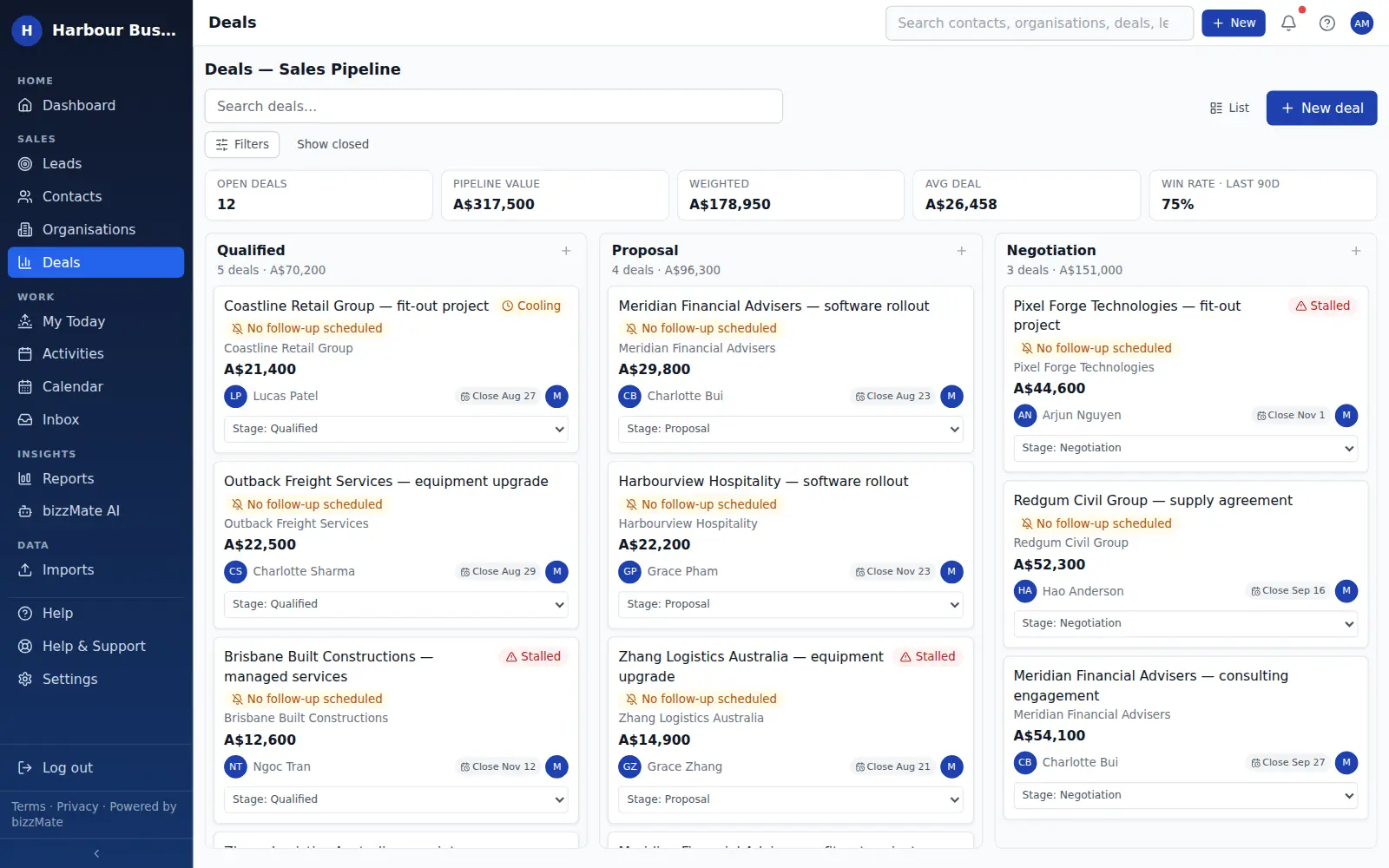
Your stages, your deals, one board. Drag an opportunity to move it, read the value sitting in each stage, and see immediately which deals have stopped moving.
No credit card required · Set up in minutes · AUD pricing
Why it matters
What sales pipeline is for
A pipeline is only useful if it is current, and it is only current if updating it takes seconds.
The bizzMate board is built for that: drag to move, per-stage totals that update as you go, and clear flags on the deals that need attention — so the board tells you what to do next, not just what exists.
At a glance
- Stages you define, in the order you sell
- Deal count and total value on every column
- Drag and drop to change stage
- A visible flag when a deal has no follow-up scheduled
- Open pipeline, weighted pipeline, average deal size and win rate above the board
Capabilities
What it actually does
Every item below is a shipped part of bizzMate today — not a roadmap entry.
Your process, not a template
Create the stages your business actually uses, set the order, and give each one the probability you believe in. bizzMate does not impose a sales methodology.
Totals where you need them
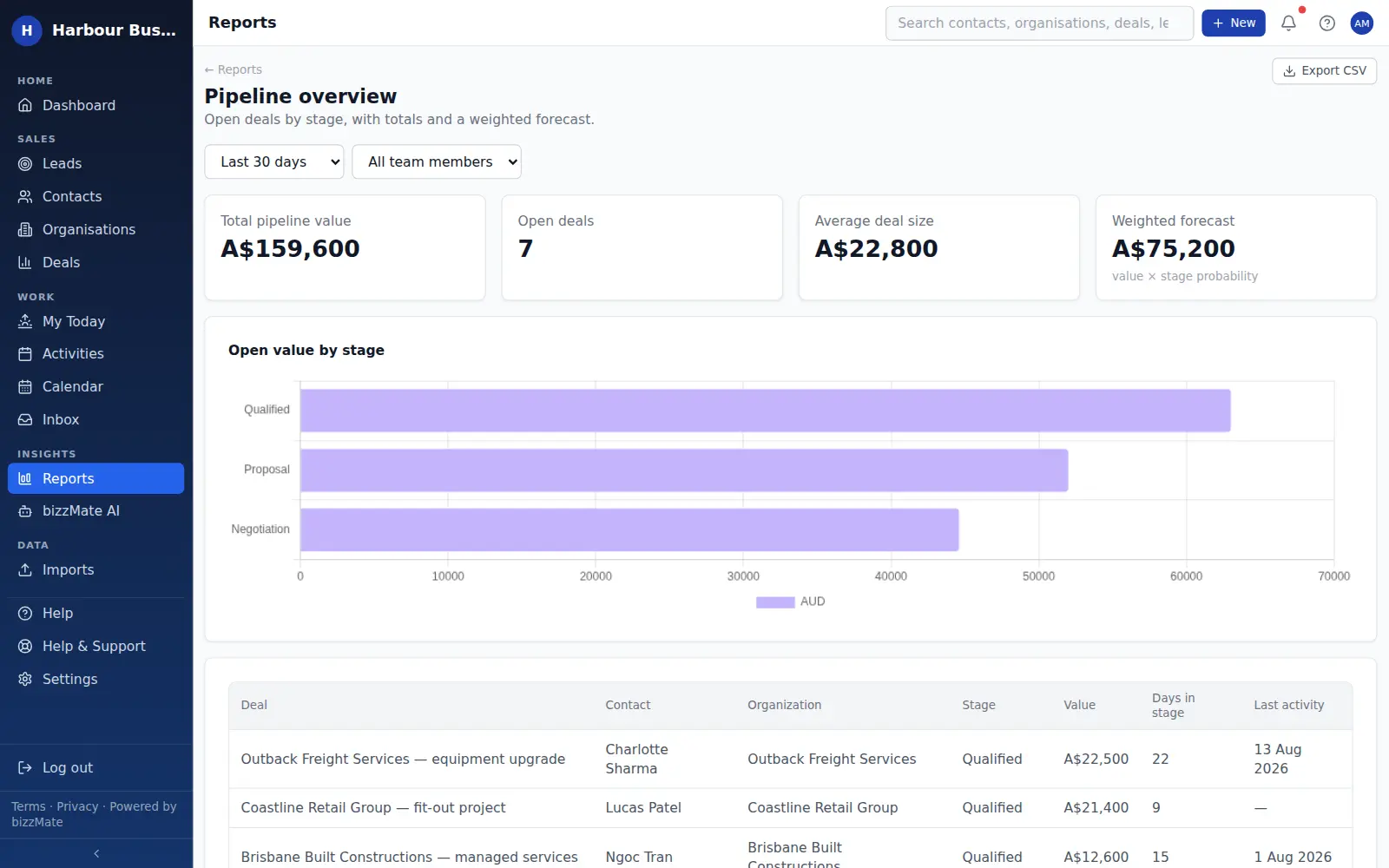
Every column carries its deal count and value, and the strip above the board shows open pipeline, probability-weighted pipeline, average deal value and win rate over the last ninety days.
Deals that have gone quiet, surfaced
A daily scan marks open deals with no recent activity as stalled and shows that on the card. Deals with no follow-up scheduled are flagged separately — the two problems are different and both matter.
Filter to the slice you are working
Search deals, filter by owner and stage, and switch to the list view when you want to sort by value or close date.
Works on a phone
On a small screen the board keeps full-width cards and scrolls stage by stage, so updating a deal between meetings is realistic rather than theoretical.
In the product
What this looks like day to day
How it works
How it fits a working day
Step 1: Set your stages once
Name them the way your team talks about deals. Most businesses need four or five, and you can change them later.
Step 2: Work the board, not a spreadsheet
Drag deals as they progress. Because the change is one gesture, the board stays true — which is the whole point.
Step 3: Clear the flags every week
Anything marked stalled or without a follow-up is a decision waiting to be made: schedule something, or close it out honestly.
Frequently asked questions
- Can I have more than one pipeline?
- Yes, depending on plan. Solo includes one pipeline, Pro includes up to ten, and Business sets no pipeline limit — useful when you sell distinct things through genuinely different processes.
- How does bizzMate decide a deal is stalled?
- A scheduled scan looks for open deals with no logged activity for a set period and marks them stalled. It is based on your actual records. A deal that has not been assessed yet is shown as not assessed rather than given a made-up status.
- What is weighted pipeline?
- The total value of your open deals, each multiplied by the probability you assigned to its stage. It is arithmetic on your own numbers, not a prediction bizzMate has made.
Explore related capabilities
- Deal managementValue, stage, owner, close date — and an honest outcome.
- DashboardPipeline, closings, win rate and what needs attention today.
- ReportingWon revenue, weighted pipeline, win/loss reasons and sales cycle.
- Activities & follow-upsCalls, tasks and meetings attached to the record they belong to.
Try sales pipeline on your own customers.
Start a free 15-day trial of bizzMate and set your workspace up in an afternoon. No credit card required.
No credit card required.