Practical AI
Practical AI. Inside your CRM.
Use AI to understand customer context and prepare useful sales work without leaving the CRM — grounded in your own workspace data, and always as a draft you review.
No credit card required · Set up in minutes · AUD pricing
Why it matters
What practical ai is for
Most CRM AI is either a chatbot bolted onto the side or a promise of autonomous selling. Neither is much use to a business with real customers.
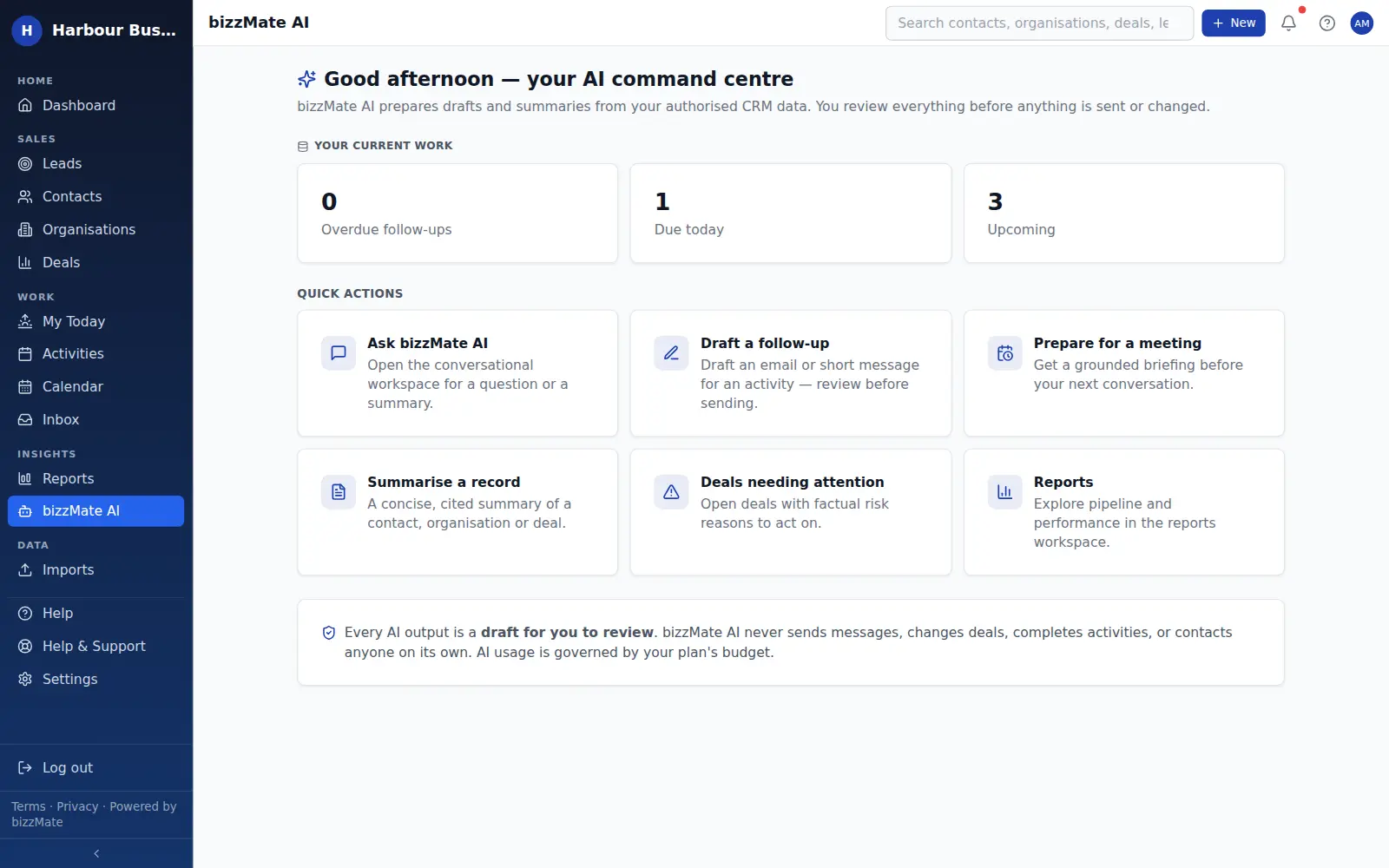
bizzMate AI does a small number of specific jobs well: it reads the records you are authorised to see, summarises them, prepares a draft, and hands it back to you.
At a glance
- Grounded summaries of a contact, organisation or deal
- Follow-up message drafts you edit before sending
- Meeting preparation from the record's own history
- A conversational workspace for questions about your data
- Answers limited to your workspace and your permissions
- Included on every plan — Essential on Solo, Standard on Pro, High on Business
Capabilities
What it actually does
Every item below is a shipped part of bizzMate today — not a roadmap entry.
Grounded in your records
Summaries are built from the CRM context you are authorised to see, and the product is explicit that AI should use only that context rather than filling gaps with invention.
Human in the loop, by design
bizzMate AI never sends a message, changes a deal, completes an activity or contacts anyone on its own. Everything it produces is a draft for you to review, edit and act on.
Inside your permissions
AI reads what you can read. Workspace isolation and role permissions apply to AI exactly as they apply to the rest of the product — there is no privileged path.
A budget, visible to you
AI usage is governed by a per-workspace budget, and owners and admins can see usage including a per-user breakdown. There is no surprise bill and no metered add-on to buy.
Nothing runs behind your back
AI is triggered by a person clicking something. bizzMate does not generate content in the background or run batch jobs against your customer data.
Not used to train models
As stated in the Privacy Policy, bizzMate does not use customer data to train AI models.
How it works
How it fits a working day
Step 1: Open the record you are about to work
A contact before a call, a deal before a review, an organisation before a renewal conversation.
Step 2: Ask for the summary
One click gives you a concise read of what has happened and what is outstanding, drawn from that record's own history.
Step 3: Take the draft and make it yours
Edit the follow-up, then send it yourself. The draft saves you the blank page, not the judgement.
Frequently asked questions
- Is AI included in my plan?
- AI assistance is included on every paid plan. What differs is capacity: Solo includes Essential usage for lighter everyday assistance, Pro includes Standard for a team using AI throughout their sales work, and Business includes High for heavier use. The AI features themselves are the same on all three.
- Will bizzMate email my customers automatically?
- No. AI drafts follow-up messages for you to review, and sending stays a human action. bizzMate does not auto-send customer-facing email under any circumstance.
- Can AI see another workspace's data?
- No. Workspace isolation is enforced at the database level and AI runs inside that same boundary, as well as inside your own role's permissions.
- Is my data used to train AI models?
- No. The Privacy Policy states that we do not use customer data to train AI models, and names the AI sub-processor used to provide the feature.
- What if I do not want to use AI at all?
- Then do not click it. AI features are user-triggered; nothing generates content on a schedule or in the background.
Explore related capabilities
- AI CRMWhat an AI CRM is, and the difference between AI that informs and AI that acts.
- Customer workspaceOne screen per record: detail, timeline, related deals and files.
- Customer timelineCalls, notes, files and synced email in one chronological thread.
- Security & privacyHow workspace isolation, access control and backups actually work.
Try practical ai on your own customers.
Start a free 15-day trial of bizzMate and set your workspace up in an afternoon. No credit card required.
No credit card required.