
Deal management
Track every opportunity properly.
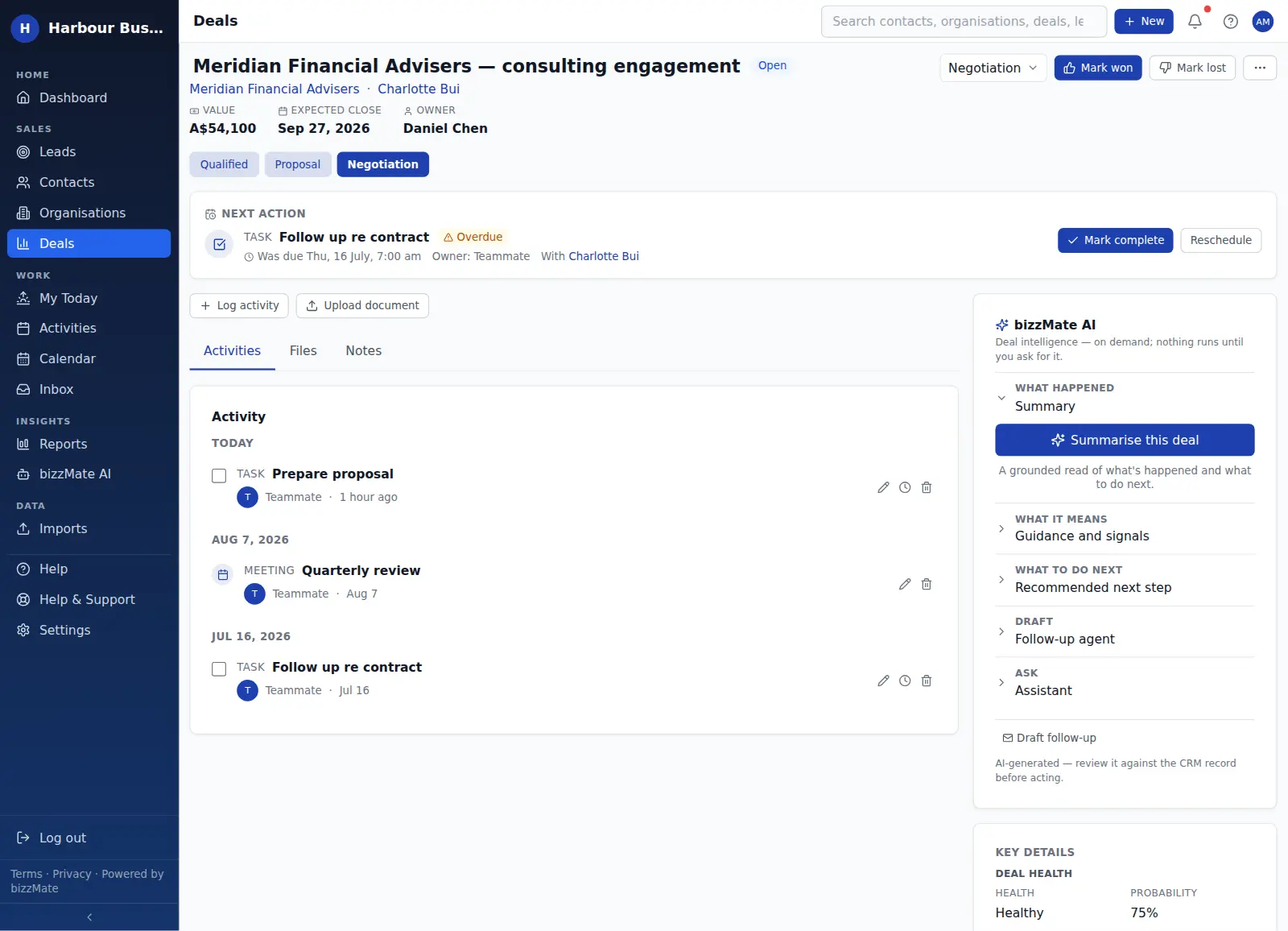
A deal in bizzMate carries the value, the stage, the owner, the expected close date, the company and person behind it — and the next thing that has to happen for it to move.
No credit card required · Set up in minutes · AUD pricing
Why it matters
What deal management is for
"How much is in the pipeline?" should take five seconds to answer, and the answer should be the same for everyone in the business.
bizzMate makes deals structured records rather than notes: values in your workspace currency, stages you define, an owner, a close date, and the activity history that explains where it really is.
At a glance
- Value in your workspace currency
- Stage, with the probability you assign to it
- An owner and an expected close date
- Linked organisation and primary contact
- Won and lost outcomes, with a recorded reason for losses
Capabilities
What it actually does
Every item below is a shipped part of bizzMate today — not a roadmap entry.
Board or list, same data
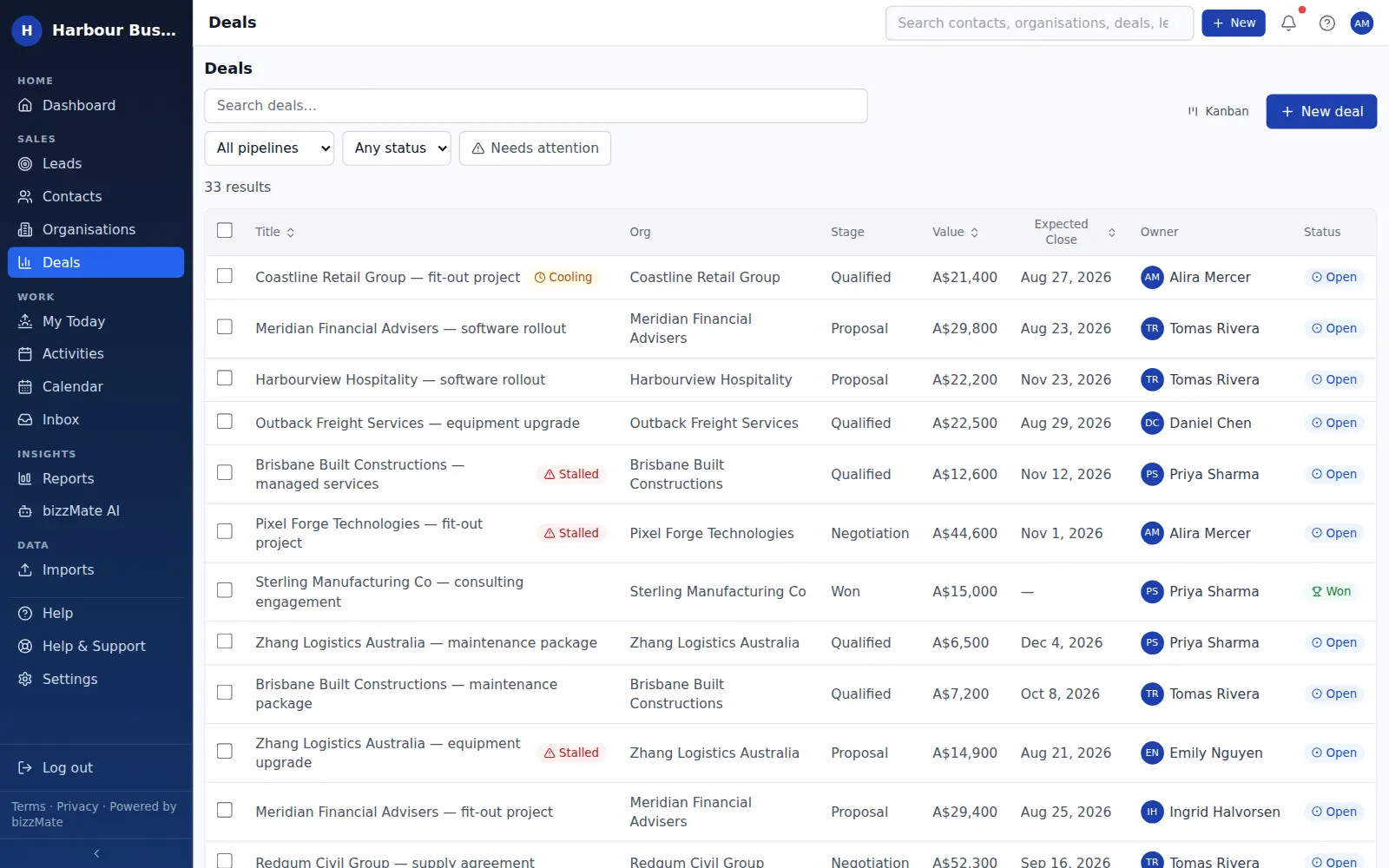
Work the pipeline as a drag-and-drop board when you are moving things along, or as a filterable, sortable list when you need to bulk-review or export.
Honest close outcomes
Closing a deal asks for the outcome. Losses record a reason, which is what makes the win/loss report worth reading three months later.
Attention signals from real inactivity
bizzMate flags open deals with no recent activity and open deals with no follow-up scheduled. Both come from your actual records — there is no invented health score or predicted probability.
The deal's own workspace
Each deal opens with its value, stage and dates up top, and its own timeline, files and linked records — so a handover is reading one page, not a conversation.
Bulk actions on the list
Select several deals in the list view to act on them together, and export a filtered view to CSV when you need it outside bizzMate.
In the product
What this looks like day to day
How it works
How it fits a working day
Step 1: Raise the deal against a real customer
Create it from the contact or organisation so it inherits the relationship rather than floating on its own.
Step 2: Move it as reality changes
Drag it to the next stage on the board, or change the stage on the record. bizzMate records when it entered the stage, which is what makes "days in stage" meaningful.
Step 3: Close it honestly
Mark it won or lost and record why. That is the data your win/loss report needs, and it is the difference between a pipeline and a wish list.
Frequently asked questions
- Can I use my own sales stages?
- Yes. Pipelines and their stages are configured per workspace, with your own names, order and probability per stage. Solo includes one pipeline, Pro includes up to ten, and Business sets no pipeline limit.
- Does bizzMate predict whether a deal will close?
- No, and it deliberately does not pretend to. It shows a weighted pipeline figure based on the probability you assign to each stage, and it flags deals with no recent activity or no scheduled follow-up. It does not invent a likelihood score.
- Can I record why a deal was lost?
- Yes. Closing a deal as lost captures a reason, and those reasons roll up into the win/loss report so you can see the patterns rather than one anecdote.
- Is there a limit on deals?
- Solo includes 100 deals and Pro includes 25,000. Business sets no deal limit. Current limits are shown on the pricing page.
Explore related capabilities
- Sales pipelineA drag-and-drop board with your own stages and per-stage totals.
- Activities & follow-upsCalls, tasks and meetings attached to the record they belong to.
- ReportingWon revenue, weighted pipeline, win/loss reasons and sales cycle.
- Customer workspaceOne screen per record: detail, timeline, related deals and files.
Try deal management on your own customers.
Start a free 15-day trial of bizzMate and set your workspace up in an afternoon. No credit card required.
No credit card required.